

Architecture
Katalogue is a metadata platform focused on being user-friendly, lightweight and simple. It has three main use cases:
- Act as an entry point for data consumers to discover and understand data across the organization.
- Link business terms and technical attributes to data assets to create a semantic layer that bridges the gap between business and IT.
- Serve as a schema registry and metadata store to assist in automation of data pipelines and other operational workflows.
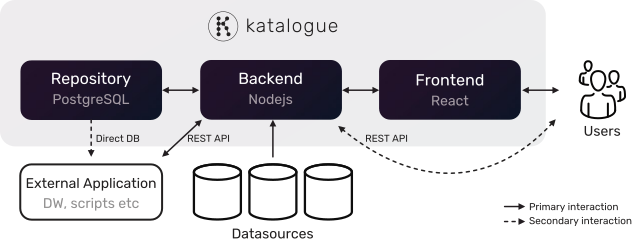
The Katalogue application is built around a simple microservice architecture with three main services. These are primarily intended to be deployed in Docker containers, either individually or with Kubernetes. It is possible to deploy Katalogue without Docker as well. This section focus on the application architecture, see Deployment Overview for more details on deployment options.
Overview of services and interactions:
| Service | Id | Technology | Description |
|---|---|---|---|
| Frontend | spa | React | Web based Single Page Application that act as GUI and main interface for users |
| Backend | api | Nodejs | Stateless, combined backend-for-frontend API to serve the Frontend service and REST API for programmatic integration. Handles read and write logic to the repository database. |
| Repository | db | PostgreSQL | Repostitory database to persist data, including search index and changelog |
Services
Section titled “Services”Frontend (spa)
Section titled “Frontend (spa)”The frontend service is the main user interface for Katalogue. Its purpose is to allow user-friendly interaction with all aspects of the application. It is a simple presentation layer that interacts with the backend service through HTTP requests.
Technically, it is a single page application (spa) built in React and served with nginx. It uses the native Javascript Fetch API to handle HTTP requests. A few other key libraries used:
- React Router for routing, i.e. navigation between different views.
- Cytoscapejs for graph/network visualization.
- Draftjs for WYSIWYG text editing.
The main data assets in the Katalogue GUI is organized under a browse section in three main hierarchial categories, or tree-like structures; Datasets, Field Descriptions and Glossaries. More details. These pages are available to all users, and most of them are editable for editor users.
Technical assets like users, connections and system settings are organized under a manage section. These pages are only available to admin users.
Backend (api)
Section titled “Backend (api)”The backend service is the I/O layer to the repository database and holds the core application logic and data validation. Its purpose is to read and write data from the repository database and serve users through the frontend service or the REST API.
Technically, it is a stateless API built in Nodejs and express. It follows a simple Model–View–Controller (MVC) architecture, where the express routes/endpoints act as Views. Due to the nature of Nodejs, the following principles have been followed:
- Models exposes asynchronous APIs (return promises / use async functions) for DB operations.
- Controllers treats model calls as asynchronous; uses async/await and central error handling (next(err) and error middleware).
- Routes are thin—call controller functions that handle returned promises (no long-running synchronous work).
- Error handling. Rejected promises are caught and passed to Express error middleware for logging and sending proper HTTP responses.
A few other key libraries used:
- Knex SQL query builder for interacting with the repository database.
- Winston for logging.
- Nodemailer for sending emails.
- OIDC Provider for REST API authentication and authorization.
- Vendor-specific libraries for connecting to datasources. See each connector in the Connectors section for details.
Repository (db)
Section titled “Repository (db)”PostgreSQL is the RDBMS used for the repository database. Its purpose is to persist data.
The entire repository is found in the katalogue database, which has two schemas:
publicis the main schema to hold all asset-, config- and other system tables, views and functions.stageis used as a temporary staging area when ingesting data from external sources.
Search Index
Section titled “Search Index”The Katalogue search functionality is based on the PostgreSQL Full Text Search functionality. There are two search indexes, one “main” search index and one “context” search index. Both are maintained in the public.search table, and the actual search indexes are the two columns searchable_vector and searchable_context_vector with the tsvector datatype. Both columns are indexed with a GIN index.
The “main” search index is the primary index to match individual assets in Katalogue, and the “context” search index can be used in addition to the main index to narrow results to a specific context. Think of the “main” search index as a register of unique properties for each asset, and the “context” search index as grouping or categorical attributes. For example, searching for “customer” might yield many results, but adding a context, such as “system X” will narrow the results. This search string would be written like “customer : system X” and can be interpreted as “search for the phrase customer in the context of system X”. The result would probably be fields and datasets in system X. The colon (:) is the separator to invoke the context search index.
See the Finding Assets page for a complete guide on using the search functionality.
Changelog
Section titled “Changelog”All changes made to tables that hold assets in Katalogue are stored in the public.changelog table. This table essentially stores a snapshot of each row (in JSON format) before and after a change in the two columns public.changelog.old_data and public.changelog.new_data. This table also holds a few other metadata columns where public.changelog.transaction_id (used to find all changes made in the same transaction) and public.changelog.operation (I = Insert, U = Update and D = Delete) are key to using the changelog table.
The changelog table is populated by database triggers (FOR EACH STATEMENT) on relevant tables to make sure that changes are tracked even if changes are made directly in the database.
Data Flow & Communications
Section titled “Data Flow & Communications”Authentication Flow
Section titled “Authentication Flow”On a high level, the following happens when an unauthenticated user tries to access Katalogue:
- User navigates to the Katalogue URL in the browser.
- Frontend service sends a request to the backend service resource endpoints to fetch relevant data.
- Request to the backend service is missing a valid access token => backend sends a HTTP 403 error.
- Frontend service sends a request to the backend service access token endpoint to get a new access token.
- Request is missing a valid refresh token => backend sends a HTTP 403 error.
- User is redirected to the login page.
- User enters credentials to login.
- Frontend service sends credentials to the backend service login endpoint.
- Backend validates the credentials and (assuming they are valid) returns the following:
- Access token (jwt) in an encrypted cookie.
- Refresh token (jwt) in an encrypted cookie.
- User data in an encrypted cookie.
- CSRF token in an encrypted cookie.
- CSRF token in HTTP request response.
- The browser stores the CSRF token from the HTTP request response in memory and persists the cookies.
Request & Authorization Flow
Section titled “Request & Authorization Flow”Assuming the user is already logged in (see Authentication flow described above), the following happens when a user navigates to a page (.e.g the page that list all systems):
- User navigates to a page in Katalogue.
- Frontend service sends a request to the backend service resource endpoints to fetch relevant data. The request contains the following:
- HTTP Request header with CSRF token
- Access token cookie
- User data cookie
- CSRF token cookie
- Resource specific data
- Backend service validates the request :
- Decrypt the attached CSRF cookie
- Match token from cookie with the CSRF token in request header
- Backend service authenticates the request:
- Decrypt and validate the access token from cookie
- Lookup user status in DB (to ensure user is not blocked)
- Backend service authorizies the request:
- Decrypt the ID cookie
- Match user data from the cookie with resource endpoint configuration
- Backend service queries DB and returns result with HTTP status 200 to Frontend service.
Data Model
Section titled “Data Model”Here is a high-level model of the main asset tables and how they are related:
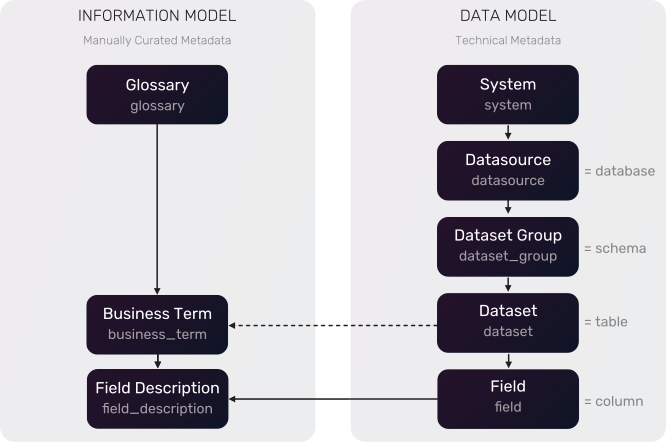
The best way to understand the Katalogue data model in detail is by introspecting it with Katalogue itself. Simply create a connection to the Katalogue repository database and sync it to your Katalogue instance. All fresh Katalogue installations comes with a pre-defined Connection to the repository database and a Katalogue Glossary with key terminology.
Naming Conventions
Section titled “Naming Conventions”| Convention | Description | Example |
|---|---|---|
| General Names | All table-, column- and function names are in snake_case, singular form. | field_description, system.system_name, update_field() |
| Colums | Most columns are prefixed with the table name to easily identify the column in joins etc. Columns that are decidedly unique for the table are not prefixed | dataset.dataset_name, field.field_name |
| Views | Views are prefixed with v_<view_name> | public.v_glossary |
| Primary Keys | All tables have primary keys. They are on the form <table_name>_id. | system.system_id is the primary key column of the “system” table. |
| Foreign Keys | Foreign keys have the same name as the primary key they refer to. | datasource.system_id is a foreign key to the system table. |
| Booleans | Boolean columns are prefixed with verbs to easily identify them. | user.is_disabled |
| Dates | Dates are always stored as timestamps, and such columns are always suffixed with “_timestamp” to easily identify them. | job.job_completed_timestamp |
| Reserved words | There are a few reserved column names:<table_name>_id Primary key of the table<table_name>_name Display name of a record, used in the GUI to identify the record.<table_name>_code Technical name of a record, used in sync tasks and code to identify the record.<table_name>_description Complementary description of a record, often used in tooltips in the GUI. | - |
Keys & Relationships
Section titled “Keys & Relationships”All tables have a primary key column on the form <table_name>_id, which is a simple serial integer and used as the main identifier for a record throughout the application. Tables can be related to each other in two ways:
- Foreign Key constraint Tables are in most cases related to each other by a foreign key constaint based on the primary key.
- object_name and object_id In a few cases where the table hold references to more than one other table, two columns are used:
object_namethat hold the name of the related table andobject_idthat hold the id of the record in the related table.
Example: Thecustom_attribute_valueandchangelogtables hold custom attribute values for all assets.
Metadata Columns
Section titled “Metadata Columns”Most tables have three metadata columns:
created_timestampTimestamp for when a row was created.modified_timestampTimestamp for when a row was last changed.modified_by_user_usernameUsername of the Katalogue User (or in some cases, the PostgreSQL database user) that made the last changes to a specific row.
Important Constraints
Section titled “Important Constraints”- Hard deletes Katalogue always do hard deletes, but as all changes are logged in the changelog table, it is possible to retrieve old records.
- Unique constraints and NOT NULL is set on tables and colums where necessary.
Deployment & Environments
Section titled “Deployment & Environments”Deployment and environments is case based for each customer. See the Deployment section for recommendations and templates, and organization-specific documentation for your specific deployment.
Scalability & Performance
Section titled “Scalability & Performance”Katalogue does not ship with pre-built features (like load balancing) for horizontal scaling, configuring this is up to each deployment. The frontend and backend services should be able to scale horizontally as they are stateless. The database service is easiest vertically scaled.
Katalogue sync tasks are sequential. It is not possible to parallelize them due to current architecture of the stage layer in the database.
Reliability & Failure Modes
Section titled “Reliability & Failure Modes”Katalogue requires all three services to be operational to function. The backend service will not start if the database is down and the frontend service will cause the browser to throw general network errors like “Failed to fetch” if the backend service is down.
Timeouts
Section titled “Timeouts”HTTP requests from the frontend service to the backend service will timeout after 30 seconds. Database queries executed from the backend service have different timeouts. The standard timeout is 60 seconds, but some long running queries can have a timeout of 30 minutes.
Error Handling Strategy
Section titled “Error Handling Strategy”Backend service operations that require editing of multiple database tables are executed in a transaction, which rollback all changes if there are errors during processing.
HTTP requests to the backend service that encounter errors are responded to with appropriate HTTP status codes.
All errors in the backend service are logged with extensive metadata and complete stack trace when available.
Error messages presented to users are designed to leave as little information about the internals of the application as possible, yet be informative enough to get an idea of what went wrong. Error messages related to authentication and authorization errors are extra brief and generic, and does not give details on exactly what went wrong (e.g. same message if the user does not exist as if the user is not properly authenticated to access a resource).
DB Backups & Recovery
Section titled “DB Backups & Recovery”Katalogue does not ship with a built-in backup & recovery feature, this is up to external tools or the deployment environment to provide.
See the Database Backup page for guidance on how to create custom backup scripts.
Security
Section titled “Security”Authentication
Section titled “Authentication”Frontend Service (spa)
Section titled “Frontend Service (spa)”The backend service uses access tokens and refresh tokens to authenticate requests from the frontend service.
- Access token and refresh token TTL is configurable.
- The tokens are JWTs (JSON Web Tokens) in encrypted cookies.
- CSRF (Cross-Site Resource Forgery) protection is included.
In addition to this, the backend service lookup user status in each request to immediately invalidate access tokens for blocked/deleted users.
REST API
Section titled “REST API”OAuth2 client credentials flow with encrypted JWT access tokens.
Authorization
Section titled “Authorization”Frontend Service (spa)
Section titled “Frontend Service (spa)”The backend service authorizes users to access resources by the means of user roles.
REST API
Section titled “REST API”The backend service authorizes users to access resources by the means of OAuth2 scopes.
Data Protection
Section titled “Data Protection”All communication between services should normally be configured to be HTTPS only. Secrets are always encrypted/hashed at rest by Katalogue. All other data is stored in plain text by default, but it might be possible to configure encryption at rest if such options are provided by your deployment environment.
Secrets Management
Section titled “Secrets Management”- Secrets are never stored in plain text anywhere.
- Secrets are never exposed in logs, not even in encrypted/hashed state.
- Secrets are never sent anywhere, they are only handled internally in the backend service. The only exception is when they are sent to the backend from frontend on creation.
- Local user passwords are one-way hashed with the Nodejs bcryptjs library.
- Datasource connection passwords and other secrets that need to be retrievable are encrypted with the built-in Nodejs crypto library. It uses the aes-256-cbc algorithm in combination with an encryption key that need to be provided as a configuration parameter/secret to Katalogue.
- All random strings used in a security context is generated with cryptographically safe algorithms.
API Protection
Section titled “API Protection”Security Headers
Section titled “Security Headers”Security headers for all HTTP requests to the backend service (both requests from the frontend service and via the REST API service) are set by the Nodejs helmet package. Katalogue uses the default settings.
CORS is configured to only let the frontend service interact with the backend service.
Rate Limiting
Section titled “Rate Limiting”Rate limiting is in the backlog, but is currently not implemented. This should be fine as long as Katalogue is not exposed to the internet.
User Input Injection
Section titled “User Input Injection”All user input is sanitized to prevent injection attacks.
Telemetry Data
Section titled “Telemetry Data”Katalogue does not collect telemetry data.
Observability
Section titled “Observability”Logging
Section titled “Logging”The Katalogue backend service logs both to local files (./logs folder for the service in the Docker container) and to console by default. The database service uses default PostgreSQL logging settings and the frontend service does not log anything.
See the Logging for configuration options and what is logged and where.
Tracing
Section titled “Tracing”All HTTP requests to the backend service can be logged. This feature is disabled by default. See the Logging page for more details.
Metrics
Section titled “Metrics”Katalogue does not store or expose any metrics on its own, it is up to the deployment environment (OpenShift, Azure etc) to provide metrics. Relevant metrics to track for each service:
- Frontend: N/A
- Backend: CPU and Memory
- Database: CPU, Disk and Memory
Key Design Principles
Section titled “Key Design Principles”- Katalogue only reads and stores metadata, never actual business data.
- Katalogue is a self-hosted application. Gives full control and ownership of the data, it never leaves the premises and can be easily integrated into existing security processes.
- Katalogue customers get full access to the source code. So you can review it yourself.
- Push logic down. As much logic and data processing as possible is pushed to the database layer. The rationale for this is to let the database do what it is good at in order to keep the entire application as performant as possible, and make logic available for direct DB integrations.
- Reduce dependencies. Use as few dependencies as possible, but use them for complex or security related functionality.
- Use proven technologies. Better to use mature, widely supported technology familiar to data teams than the latest cutting edge tech, even if it is cool.